
Circle & Unit Circle Calculator (Step by Step Solutions)
Use this comprehensive Circle & Unit Circle Calculator to instantly solve for both geometric dimensions and trigonometric values. Whether you need to find the area and circumference of a physical circle or the exact sine and cosine coordinates on a unit circle, this tool calculates everything automatically with full step-by-step solutions.
Designed specifically for students and educators, our solver doesn’t just provide an answer—it reveals the underlying algebra and trigonometry. Switch between Geometry Mode for linear measurements or Unit Circle Mode for angular analysis to see exactly how every result is derived.
Circle & Unit Circle Calculator Pro
What This Circle Calculator Does in Geometry Mode
This tool works as a complete circle geometry calculator. It allows you to:
- Find radius from area or circumference
- Calculate area of a circle
- Calculate circumference of a circle
- Convert between radius and diameter
- View step-by-step algebraic working
You only need one known value, and the calculator will derive all remaining values using standard formulas.
Unit Circle Calculator Mode
While a general circle can have any radius, the Unit Circle is a specific circle used in trigonometry with a radius of exactly 1 i.e r=1, centered at the origin (0,0).
Our Unit Circle Solver is designed to take the guesswork out of complex trig homework. Unlike a standard calculator that only gives you decimals like 0.8660, our tool provides the exact radical forms \(\sqrt{3}/2\) used in exams.
How to Use the Unit Circle Solver
Choose your Input: Enter your angle in Degrees or Radians you can type “pi/4”.
Explore Coordinates: The solver instantly calculates the (x, y) coordinates, where x = cos(θ) and y = sin(θ) .
Reference Angles: The tool automatically finds the Reference Angle θ to help you understand the geometry in any quadrant.
Identify the Quadrant: Using the ASTC Rule (All Students Take Calculus), the solver highlights whether your Sine, Cosine, or Tangent values should be positive (green) or negative (red).
Learn How the Unit Circle Works
This calculator gives instant answers, but understanding the logic behind the unit circle helps you memorize angles faster.
Read our complete Unit Circle Guide covering:
- radians
- quadrants
- sine and cosine values
- memorization tricks
- tangent chart
- common formulas
Understanding Each Formula
Before using the tool, it helps to understand what each formula actually represents.
Diameter is simply twice the radius. The radius is the distance from the center of a circle to its edge, and the diameter is a straight line passing through the center from one edge to the other. This is always the simplest relationship in circle geometry:
\(d = 2r\)
Circumference is the total distance around the outside of a circle — the perimeter of the circle. It is calculated using the formula \(C = 2\pi r\), which can also be written as \(C = \pi d\) since \(d = 2r\). Both forms are mathematically identical.
Area is the total space enclosed within the circle. The formula \(A = \pi r^2\) tells us that area grows with the square of the radius — so doubling the radius does not double the area, it quadruples it. This is a concept many students misunderstand until they see it demonstrated numerically.
Reverse calculations — finding the radius from area or circumference — require rearranging these formulas algebraically. This is where many students lose marks in exams, because the rearrangement steps are easy to make errors in. The solver shows these steps explicitly so you can follow along and learn the correct method.
Unit Circle Chart (Degrees & Radians)
For many students, having a Unit Circle Table for standard angles is the key to mastering trigonometry. Below are the most common values found on the unit circle:
|
Degrees (°) |
Radians (rad) |
cos(θ)(x) |
sin(θ)(y) |
tan(θ) |
|---|---|---|---|---|
|
0° |
0 |
1 |
0 |
0 |
|
30° |
\(\pi/6\) |
\(\sqrt{3}/2\) |
\(1/2\) |
\(\sqrt{3}/3\) |
|
45° |
\(\pi/4\) |
\(\sqrt{2}/2\) |
\(\sqrt{2}/2\) |
1 |
|
60° |
\(\pi/3\) |
\(\frac{1}{2}\) |
\(\sqrt{3}/2\) |
\(\sqrt{3}\) |
|
90° |
\(\pi/2\) |
0 |
1 |
Undefined |
Essential Unit Circle Formulas
To solve circle geometry manually, you’ll need these fundamental identities:
- The Pythagorean Identity: \(\cos^2(\theta) + \sin^2(\theta) = 1\)
- Tangent Relationship: \(\tan(\theta) = \frac{\sin(\theta)}{\cos(\theta)}\)
- Degree to Radian Conversion: \(\text{Radians} = \text{Degrees} \times \frac{\pi}{180}\)
Solving Reference Angles & Coterminal Angles
If you enter an angle larger than \(360^\circ\) \(like 450^\circ\), our tool calculates the Coterminal Angle \(90^\circ\). This is the position where the angle “stops” on the circle.
How to find the Reference Angle:
- Quadrant I: \(\theta’ = \theta\)
- Quadrant II: \(\theta’ = 180^\circ – \theta\)
- Quadrant III: \(\theta’ = \theta – 180^\circ\)
- Quadrant IV: \(\theta’ = 360^\circ – \theta\)
Circle Geometry Units (Theory & Exercises)
- Unit 9: Chords of a Circle
- Unit 10: Tangent to a Circle
- Unit 11: Chords and Arcs
- Unit 12: Angle in a Segment of a Circle
Mastering the Two Modes of the Circle Solver
Whether you are calculating the area of a physical object or solving complex trigonometric identities, our tool adapts to your needs. Use the guide below to understand which mode is right for your current math problem.
Mode 1: Geometry & Dimensions
Our Geometry Mode is designed to be a “full-stack” circle solver. Instead of just giving you an answer, it provides a complete mathematical breakdown. Here is how to navigate the two main sections of the tool.
Dynamic Input & Scaling
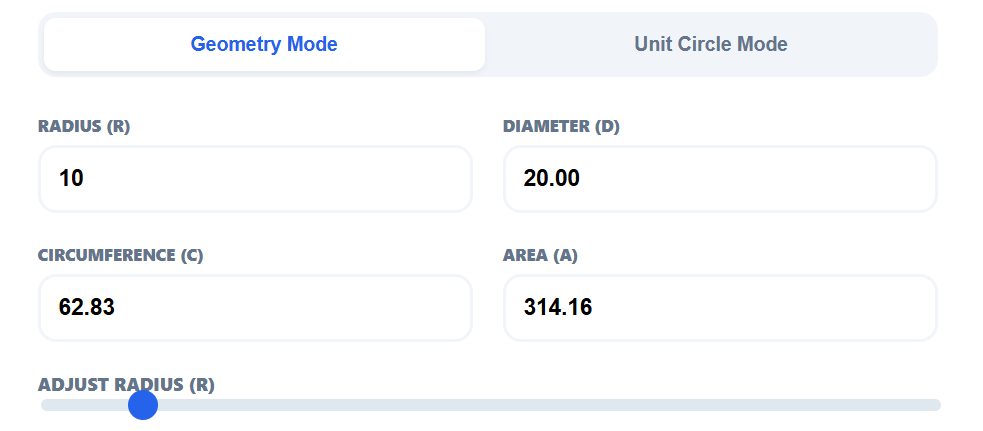
Best for: Quick conversions and visual estimation.
Key Features:
- Any-Field Input: You don’t need the radius to start. Type into the Area or Circumference box, and the tool will instantly “reverse-calculate” the radius and diameter.
- Interactive Slider: The slider below the inputs allows for rapid exploration. As you slide, you can watch the values in all four boxes change simultaneously, helping you understand the relationship between linear size and area.
- Visual Representation: The SVG diagram updates its scale in real-time, providing a red-dashed radius line to help you visualize the distance from the center.
Expert Solution Breakdown
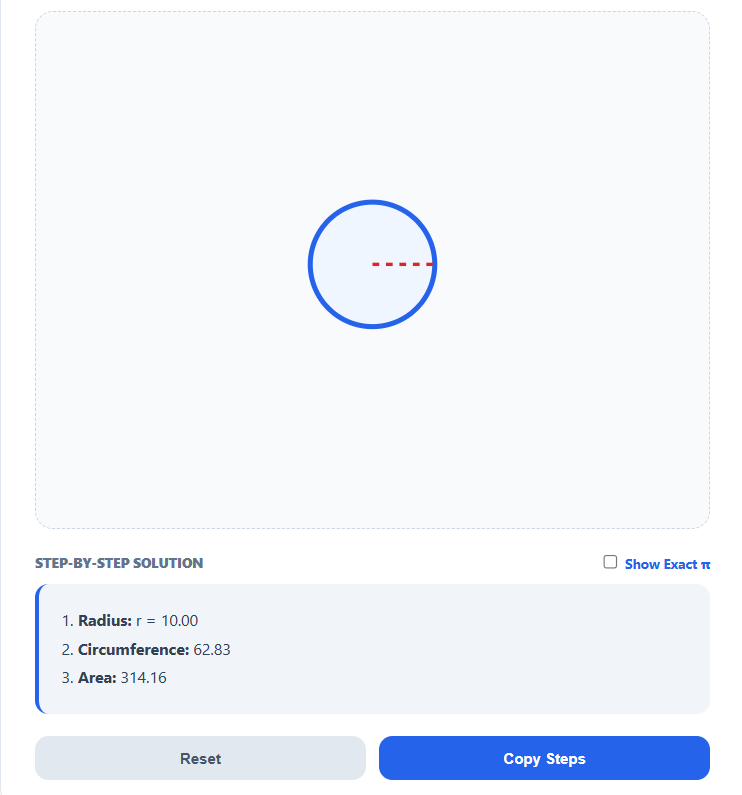
Best for: Homework verification and exam preparation.
Key Features:
- Formula Transparency: The tool doesn’t just “spit out” a number. It lists the exact formula used (like $C = 2\pi r$) so you can learn the theory while you solve.
- Algebraic Clarity: For reverse calculations (like finding radius from area), the analysis shows the rearranged formula. This is where most students make mistakes, and seeing the logic explicitly prevents errors.
- High-Precision Results: Values are provided to four decimal places, ensuring that your work remains accurate for advanced physics or engineering problems.
Mode 2: Unit Circle Calculator
Switching to Unit Circle mode transforms the tool into a specialized trigonometry assistant. This mode is designed to help you visualize angles and find exact coordinates on a coordinate plane where radius of the circle is 1.
Universal Angle Input
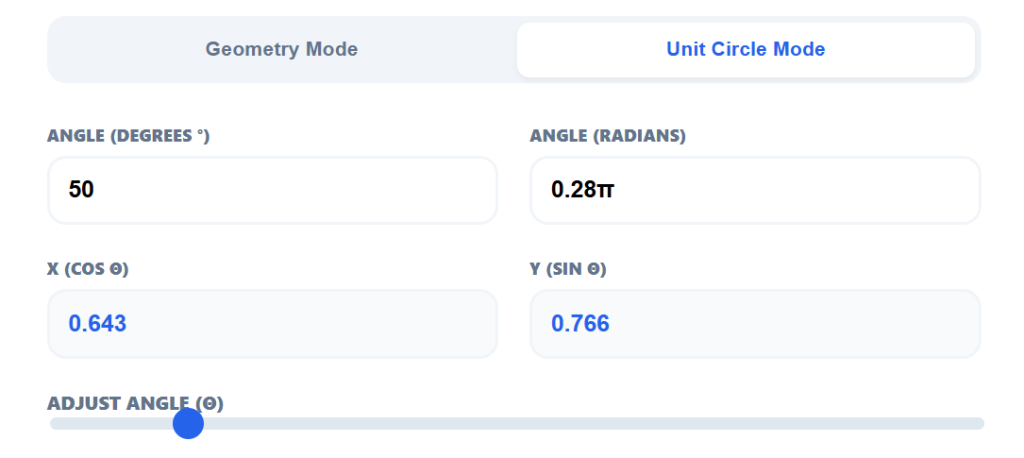
Best for: Converting between Degree and Radian measures.
Key Features:
- Sync-Input System: Enter an angle in Degrees or Radians (supports text input like
pi/4). The tool instantly synchronizes both fields, making it a powerful conversion tool. - Rotational Visualization: The SVG diagram updates to show the exact terminal side of the angle. The red line sweeps across the four quadrants, helping you visualize the angle’s position in real-time.
- Standard Angle Snapping: When you move the slider, the tool effectively maps to standard unit circle positions, providing a clear visual of where values like 30° and 210° sit on the axes.
Expert Trigonometric Analysis
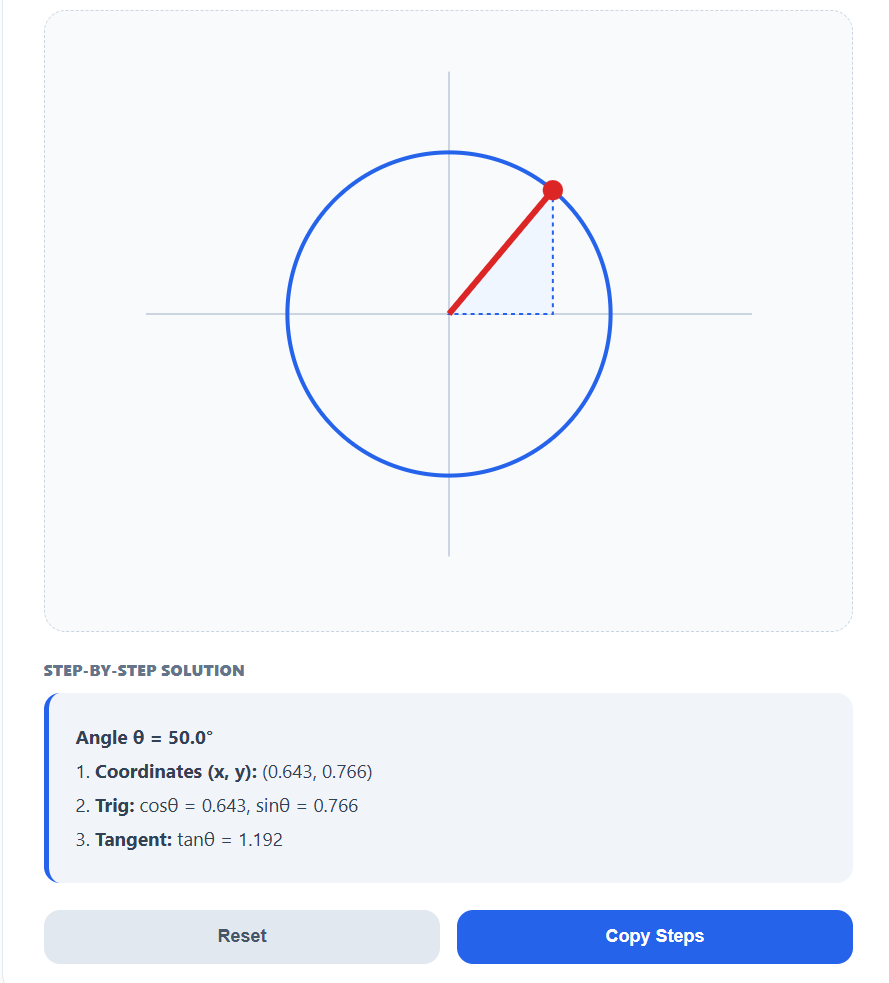
Best for: Solving for Sine, Cosine, and Reference Angles.
Key Features:
- Exact Radical Outputs: For standard angles, the tool skips the decimals and provides exact radical forms e.g., \(\frac{\sqrt{3}}{2}\). This is the format required for high-level math and engineering exams.
- Automated Angle Logic: The analysis automatically calculates the Reference Angle and Coterminal Angle. This is vital for angles larger than 360° or negative rotations.
- ASTC Color-Coding: Following the “All Students Take Calculus” rule, the tool highlights the sign of your trig functions. Green indicates positive values, while Red indicates negative, helping you memorize quadrant rules through repetition.
Common Student Mistakes This Tool Helps Avoid
Even with a formula sheet, circle geometry and trigonometry can be tricky. This tool is specifically programmed to guard against the four most common errors students make in exams:
1. Forgetting to Square the Radius
A classic mistake in Geometry Mode is calculating Area as \(\pi \times r\) instead of \(\pi \times r^2\). Our solver explicitly shows the squaring step in the Expert Analysis section, reinforcing that area grows quadratically, not linearly.
2. Confusing Radius and Diameter
Many students accidentally plug the Diameter into a formula that requires the Radius. Because our tool displays all four dimensions (r, d, C, A) simultaneously, you can instantly verify which value you are using.
3. Incorrect Formula Rearrangement
Finding the radius when you only know the Area or Circumference requires precise algebra (e.g., \(r = \sqrt{A/\pi}\)). These “reverse calculations” are where most marks are lost. The tool shows the exact rearranged formula for every calculation, serving as a step-by-step guide for your own manual work.
4. Wrong Sign in Trig Quadrants
In Unit Circle Mode, it is easy to forget which values are negative in Quadrants II, III, or IV. Following the ASTC (All Students Take Calculus) rule, our tool uses Color-Coded Logic—highlighting positive values in Green and negative values in Red—so you never lose points for a missing minus sign again.
5. Decimal vs. Exact Radical Forms
Standard calculators often provide decimals like 0.7071, but math examiners usually require Exact Radical Forms like \(\sqrt{2}/2\). Our Unit Circle solver provides these exact forms for all standard angles, ensuring your homework matches the expected textbook answers.
Who Is This For?
This Circle & Unit Circle Solver is designed to be a comprehensive resource for:
- Secondary School Students (Grades 9–10): Mastering area, circumference, and basic circle dimensions.
- College & Pre-Calculus Students: Solving trigonometric identities and finding exact coordinates on the unit circle.
- Teachers & Tutors: Using the interactive slider and dynamic SVG diagram for live classroom demonstrations.
- Exam Prep: Students who need to verify their Working Steps, not just their final answer, to ensure they are following the correct algebraic path.
Exact \(\pi\) vs. Decimal — Which Should You Use?
- Decimal Form (e.g., 314.16): Best for real-world applications, physics problems, or when a question asks for a specific degree of rounding (e.g., “to 2 decimal places”).
- Exact \(\pi\) Form (e.g., 100\(\pi\): Required in many competitive math exams and advanced geometry. It prevents rounding errors and is considered the most mathematically “pure” answer.
- Exact Radical Form (e.g., \(\sqrt{3}/2\): The standard for trigonometry. If your question involves the unit circle, you should almost always provide the radical form unless asked otherwise.
Frequently Asked Questions (SEO FAQ)
What is the formula for the area of a circle?
Area = \(\pi r^2\). Our tool shows the step-by-step substitution for this formula in Geometry Mode.
How do you find the radius from the circumference? Use the formula \(r = C / (2\pi)\). The tool performs this rearrangement automatically if you enter a value in the Circumference field.
What is the Unit Circle? It is a circle with a radius of exactly 1 centered at \((0,0)\). It is used to define the trigonometric functions (Sine, Cosine, and Tangent) for all angles.
How do I find the Reference Angle? The reference angle is the smallest angle that the terminal side makes with the x-axis. In Unit Circle Mode, our solver identifies the quadrant and calculates this for you instantly.
Is Tangent always positive in the third quadrant? Yes. Following the ASTC rule, only Tangent (and its reciprocal Cotangent) is positive in Quadrant III. Our tool highlights this in green when you enter an angle between \(180^\circ\) and \(270^\circ\).
Final Note
Most online calculators are built for quick computation—they take a number in and return a result. While useful for professionals, these “black box” tools often leave students in the dark.
This Circle & Unit Circle Solver was built with a different philosophy: to make the mathematical path from input to result fully visible. By combining high-precision calculation with step-by-step algebraic working and real-time visualization, we provide a learning environment rather than just a utility.
Whether you are trying to understand how doubling a radius quadruples a circle’s area, or you are struggling to visualize why Sine is negative in the third quadrant, this tool provides the clarity needed to master the concept.
Accuracy, explanation, and visualization—all in one place.