
Matrix Calculator
Matrix problems get messy fast — one small arithmetic slip three steps into a determinant or an inverse, and the whole answer is wrong. This matrix calculator does the arithmetic in exact fractions, shows every row operation it performs, and covers everything from a simple determinant to eigenvalues and solving systems of equations — for matrices up to 8×8.
Unlike calculators that quietly switch to rounded decimals once things get complicated, every result here stays in exact fraction form unless you choose to view it as a decimal. 1/3 stays 1/3. It never becomes 0.333.
What This Matrix Calculator Can Do
This is a full linear algebra workspace, not just a determinant tool. Depending on whether you’re working with one matrix or two, you can:
Single-matrix operations:
- Determinant
- Inverse (A⁻¹)
- Transpose (Aᵀ)
- Rank
- Row Echelon Form (REF)
- Reduced Row Echelon Form (RREF)
- Scalar multiplication (k·A)
- Matrix powers (Aᵏ, including negative and zero exponents)
- Trace
- Adjugate (adjoint)
- LU decomposition
- Eigenvalues and eigenvectors
Two-matrix operations:
- Addition (A + B) and subtraction (A − B)
- Multiplication both ways (A × B and B × A — these are usually different!)
- Solving A·X = B for X
Every operation supports matrices up to 8×8, and every result comes with a Show Steps toggle so you can see the actual row operations, not just the final answer.
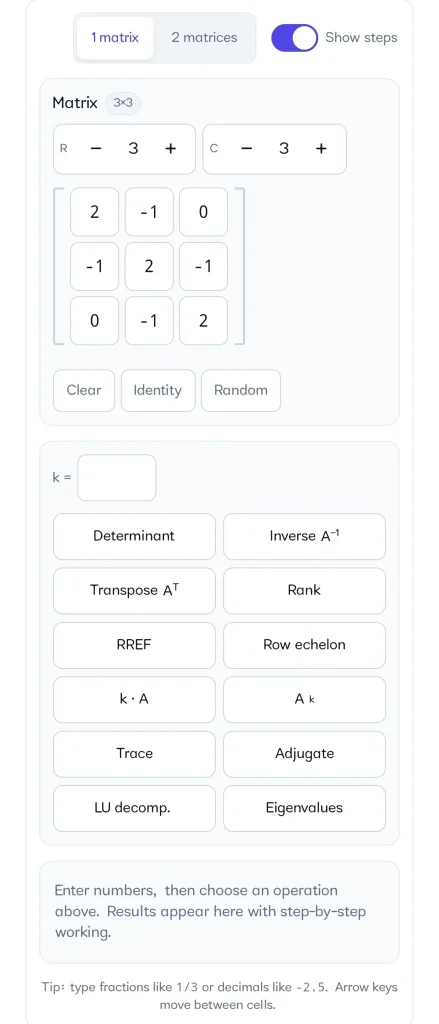
Entering Values
The calculator accepts:
- Whole numbers —
7,-3 - Fractions —
1/3,-5/8 - Decimals —
2.5,-0.75 - Scientific notation —
1.2e-3 - Empty cells count as zero
You can also paste a whole block of numbers straight into any cell — rows separated by line breaks or semicolons, values separated by spaces or commas — and the grid resizes automatically to fit what you pasted.
How to Use the Matrix Calculator
Single Matrix Mode
- Set your matrix size using the row/column steppers (up to 8×8).
- Enter your values — use the Identity or Random buttons if you just want to try the tool out.
- Pick an operation: Determinant, Inverse, Transpose, Rank, RREF, REF, k·A, Aᵏ, Trace, Adjugate, LU decomposition, or Eigenvalues.
- Toggle Show steps to see the full row-by-row working, not just the final result.
Two Matrix Mode
Switch to “2 matrices” at the top to work with Matrix A and Matrix B side by side. From here you can add, subtract, multiply in either order, or solve A·X = B directly.
Understanding the Results
Determinant (det A)
The determinant is a single number computed from a square matrix that tells you whether it’s invertible.
- det(A) = 0 → the matrix is singular — no inverse exists
- det(A) ≠ 0 → the matrix is invertible
For 2×2 and 3×3 matrices, the calculator shows the working as cofactor expansion, the same way you’d do it by hand. For larger matrices, it row-reduces to triangular form and multiplies the diagonal — far faster than cofactor expansion once you’re past 3×3, and it still shows every step.
Inverse (A⁻¹)
The inverse of A is the matrix that satisfies A · A⁻¹ = I (the identity matrix). It’s found by row-reducing the augmented matrix [A | I] until the left side becomes the identity — the calculator shows this exact process step by step.
- Only exists when det(A) ≠ 0
- If the matrix is singular, the calculator tells you directly rather than showing a broken result
Transpose (Aᵀ)
Flip rows into columns. A 2×3 matrix becomes 3×2. Simple, but it comes up constantly in later steps like computing AᵀA or checking symmetry.
Rank and Row Echelon Forms
Rank is the number of linearly independent rows (or columns) in a matrix — it tells you how much genuinely new information the matrix contains.
- REF (row echelon form) — the triangular shape you get from forward elimination
- RREF (reduced row echelon form) — REF taken further, so every pivot is 1 and every other entry in a pivot column is 0
RREF is what you use to read off the solution to a system of equations directly, or to see the null space of a matrix at a glance.
Trace
The trace is the sum of a matrix’s diagonal entries. It’s a quick sanity check for eigenvalue problems, since the trace always equals the sum of the eigenvalues (counted with multiplicity) — useful for checking your eigenvalue answer without recomputing anything.
Adjugate (Adjoint)
The transpose of the cofactor matrix. It matters because of one identity:
A⁻¹ = adj(A) / det(A)
This is the “long way” to compute an inverse — the calculator uses row reduction instead because it’s faster for larger matrices, but the adjugate is worth understanding on its own since it shows up in Cramer’s Rule and other exam-standard methods.
LU Decomposition
LU decomposition splits a matrix into a lower-triangular matrix L and an upper-triangular matrix U, such that A = L · U. It’s the standard way computers actually solve large systems of equations efficiently, rather than computing a full inverse.
Not every matrix has a plain LU decomposition — some require row swaps first (a PA = LU form). When that’s the case, the calculator tells you directly instead of returning an incorrect result.
Eigenvalues and Eigenvectors
An eigenvalue λ and its eigenvector v satisfy:
A·v = λ·v
In plain terms: applying the matrix to that particular vector doesn’t change its direction — only its length, by a factor of λ.
The calculator finds the characteristic polynomial det(λI − A) = 0 and solves it. When the roots are rational, you get exact eigenvalues and eigenvectors — no decimals. When the roots are irrational or complex (which happens often — most matrices don’t have “nice” eigenvalues), the calculator switches to a numeric approximation and tells you it’s doing so.
This also correctly handles a case a lot of simpler calculators get wrong: matrices where an eigenvalue repeats but doesn’t have a full set of independent eigenvectors to match (called a defective matrix). The calculator reports exactly how many independent eigenvectors actually exist for each eigenvalue — not just one per repeat.
Solving A·X = B
Given A·X = B, the calculator row-reduces the augmented system and tells you which of three situations you’re in:
- Unique solution — one exact answer
- No solution — the system is inconsistent (it reduces to something like 0 = 5)
- Infinitely many solutions — the calculator gives you a particular solution plus the free-parameter (null space) directions, so you can write the full general solution yourself
Worked Example
Enter:
\[A = \begin{pmatrix} 1 & 2 \\ 3 & 4 \end{pmatrix}\]
The calculator returns:
- Determinant = −2
- Adjugate = \(\begin{pmatrix} 4 & -2 \\ -3 & 1 \end{pmatrix}\)
- Inverse = \(\begin{pmatrix} -2 & 1 \\ 3/2 & -1/2 \end{pmatrix}\)
- Transpose = \(\begin{pmatrix} 1 & 3 \\ 2 & 4 \end{pmatrix}\)
- Trace = 5
- Eigenvalues = the roots of λ² − 5λ − 2 = 0 (irrational — shown as decimals: λ ≈ 5.372, λ ≈ −0.372)
Notice the inverse keeps 3/2 and -1/2 as exact fractions rather than rounding to 1.5 and -0.5.
Want more practice? Explore a complete set of matrix exercise solutions with detailed steps.
Important Matrix Formulas
1. Determinant of a 2×2 Matrix
For \(A = \begin{bmatrix} a & b \\ c & d \end{bmatrix}\):
det(A) = ad − bc
2. Determinant of a 3×3 Matrix
For \(A = \begin{bmatrix} a & b & c \\ d & e & f \\ g & h & i \end{bmatrix}\):
det(A) = a(ei − fh) − b(di − fg) + c(dh − eg)
This is cofactor expansion along the first row.
3. Inverse of a 2×2 Matrix
A⁻¹ = \(1 / (ad − bc) · \begin{bmatrix} d & -b \\ -c & a \end{bmatrix}\)
Only valid when ad − bc ≠ 0.
4. General Inverse Formula
A⁻¹ = adj(A) / det(A)
Valid for any square matrix with a non-zero determinant.
5. Cofactor Formula
Cᵢⱼ = (−1)ⁱ⁺ʲ · Mᵢⱼ
where Mᵢⱼ is the minor — the determinant of the submatrix formed by deleting row i and column j.
6. Characteristic Polynomial and Eigenvalues
det(λI − A) = 0
Solving this equation for λ gives the eigenvalues. For an n×n matrix, this is a degree-n polynomial — meaning up to n eigenvalues (some may repeat, some may be complex).
7. Trace–Eigenvalue Relationship
trace(A) = sum of all eigenvalues (with multiplicity) det(A) = product of all eigenvalues (with multiplicity)
Both are fast ways to sanity-check an eigenvalue calculation by hand.
Common Mistakes Students Make
- Forgetting that the inverse only exists when the determinant is non-zero
- Confusing the adjugate with the transpose — they’re related but not the same thing
- Assuming every matrix has a plain LU decomposition — some genuinely need row swaps first
- Treating a repeated eigenvalue as automatically having the same number of independent eigenvectors — it doesn’t always
- Rounding intermediate steps by hand, which compounds errors by the final answer — this is exactly what exact-fraction arithmetic avoids
- Multiplying B × A when the problem asks for A × B — matrix multiplication is not commutative, and the two orders usually give different results
Why Use This Matrix Solver?
- Exact fraction arithmetic throughout — nothing rounds unless you explicitly switch to decimal view
- Full step-by-step row operations shown for every method, not just the final answer
- Handles matrices up to 8×8, covering everything from intro algebra through a full linear algebra course
- Correctly distinguishes defective matrices (repeated eigenvalues with fewer independent eigenvectors) rather than assuming a full set
- Solves A·X = B and correctly reports unique, inconsistent, or infinite-solution cases — including the free-parameter form for infinite solutions
- Nothing leaves your browser — all computation happens locally
When to Use This Matrix Calculator
This tool is built for:
- High school algebra (matrices, determinants, basic systems)
- College and university linear algebra — rank, RREF, eigenvalues, LU decomposition, solving systems
- Engineering, computer science, and physics coursework where matrices show up constantly
- Checking homework or exam practice before you submit
- Quickly verifying a hand calculation without redoing all the row operations yourself
Disclaimer
This matrix calculator is designed for educational use and general guidance. While the arithmetic itself is computed exactly using fraction-based math (not floating-point rounding), we recommend double-checking critical academic or professional calculations against your course material or another source.
Final Thoughts
Matrices show up everywhere once you get past the introductory chapter — computer graphics, systems of equations, eigenvalue problems in physics and engineering, and more. This calculator is built to help you get through the arithmetic quickly and correctly, but the real value is in the steps: use Show steps to actually see how each result is built, not just what it is.
Similar Tools
- Quadratic Equation Solver
- Circle Calculator
- Simultaneous Equations Solver
- Right Triangle Solver
- Scientific Notation, % and Fraction Calculator
Frequently Asked Questions
What is a matrix calculator?
A matrix calculator is an online tool that performs operations on matrices — determinant, inverse, rank, eigenvalues, and more — quickly and without manual arithmetic errors.
What size matrices does this calculator support?
Up to 8×8, for every operation including determinant, inverse, and eigenvalues.
Does this calculator show exact fractions or decimals?
Exact fractions by default — 1/3 stays 1/3 rather than rounding to 0.333. You can switch to decimal view from the result panel any time, and choose how many decimal places to show.
Can I find the inverse of any matrix?
No — the inverse only exists when the determinant is not equal to zero. If the matrix is singular, the calculator will tell you directly rather than returning an incorrect result.
Does this calculator find eigenvalues and eigenvectors?
Yes. When the eigenvalues are rational, you get exact values and exact eigenvectors. When they’re irrational or complex — which is common — the calculator switches to a decimal approximation and lets you know.
Can this calculator solve a system of equations?
Yes, using the “Solve A·X = B” operation in two-matrix mode. It correctly identifies whether the system has a unique solution, no solution, or infinitely many solutions, and shows the general form when there are infinitely many.
Does this calculator support square roots or π as direct input?
Not currently — input accepts whole numbers, fractions, decimals, and scientific notation (like 1.2e-3). For an irrational value like √2, enter its decimal approximation (1.41421) instead.
What is LU decomposition used for?
It splits a matrix into a lower-triangular matrix (L) and an upper-triangular matrix (U) such that A = L·U. It’s a faster way to solve large systems of equations than computing a full inverse, and it’s how most numerical software handles linear systems internally.
What happens if a matrix needs row swaps for LU decomposition?
The calculator tells you directly — some matrices need row swaps first (a PA = LU form) and don’t have a plain LU decomposition, so you won’t get a silently incorrect result.